Unhappy Path: stress-testing the web apps AI models build
A benchmark that breaks the network, the data and the screen on purpose, run on 252 apps built by seven AI models.
Harley Zhang · November 2026
Unhappy Path is a benchmark for one question: when an AI model builds a web app, does the app survive real conditions? Real conditions here means a slow network, a failed request, a reply that is not JSON, a name four times longer than the layout expected, a phone-sized screen, or a keyboard with no mouse. Each model builds small React apps from a product brief. A browser then replays every app under conditions the model never saw, and each condition ends in a pass or a fail by a written rule. No model is used as a judge.
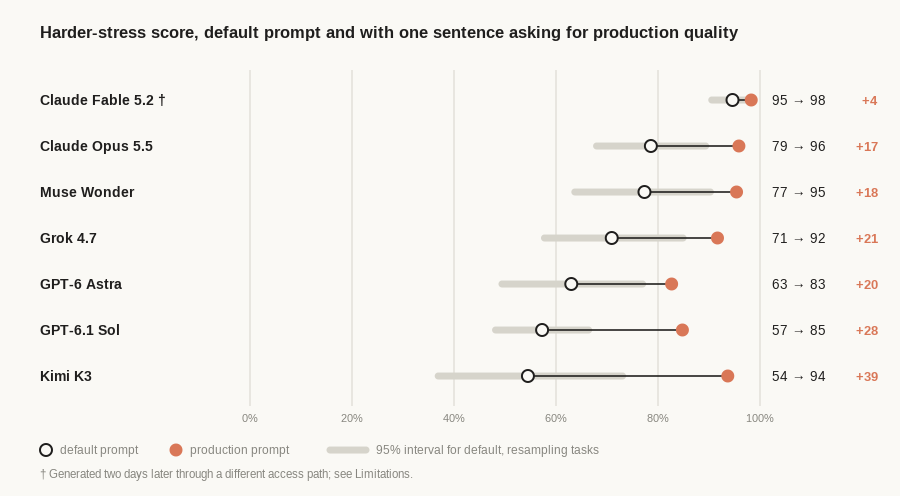
This post reports the first full run: seven models, six tasks, two prompts and three runs of each, for 252 apps and 3,402 verdicts. Every model already handles the states people usually test for (loading, error, empty), so those no longer tell models apart. The harder conditions do. On the default prompt, the six models that ran together score between 54% and 79%, and a seventh added later scores 95%. Adding one sentence that asks for production quality lifts six of the seven by 17 to 39 points, and most of the gap between models goes away. A second round on six new tasks, with its predictions registered before any app was built, reproduced the default order with a rank correlation of 0.96, and all five predictions held.
The run was repaired more than once along the way, the first time after a model read the grading code, and no independent person has checked the verdicts yet. The repairs and the limits are covered in the same detail as the results.
Why break things on purpose
Benchmarks for generated interfaces mostly score one of three things. Design2Code and the work that followed it compare a screenshot of the output with a target design. WebGen-Bench and similar suites have an agent click through functional test cases. WebDev Arena asks people which of two apps they prefer. ArtifactsBench renders each artifact, captures screenshots over time and scores them with a multimodal model. All of them test the app under normal conditions: one window size, a backend that answers at once, tidy sample data.
In production, interfaces tend to break in other ways. A request times out, a customer's company name is eighty characters long, or a proxy returns an HTML error page with status 200. A screenshot of the normal flow does not cover any of these, and someone voting between two apps in a preview pane will rarely trigger them.
So the benchmark does two things differently. It breaks conditions deliberately and from outside the app, so the app needs no test hooks and cannot tell it is being tested. And every verdict comes from a browser measurement checked against a written rule, so anyone can re-run a result or dispute a specific check.
How a run works
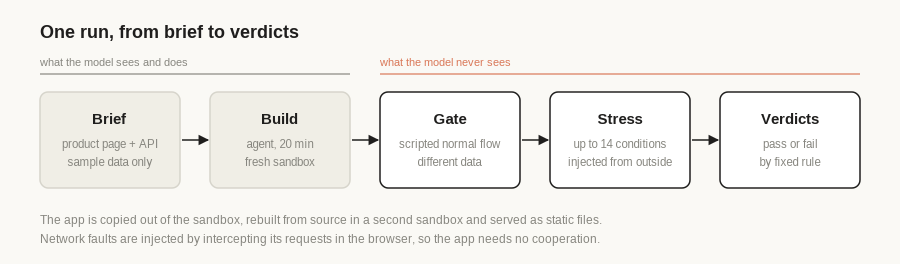
The task. Each task is a one-page product brief with a small JSON API. This run has six: a release-notes list, a bank account page and an event page that each make two requests, a product search, an invitation form and a workspace settings form. The brief names the fields and buttons a user would see, which also lets a script find them. It says nothing about loading, errors or screen sizes. This is the whole brief for the invitation form, minus its API section:
Build the "Invite a teammate" page of a team workspace app.

The page is a form with these fields:
- "Full name" (single line, required)
- "Work email" (the teammate's email address, required)
- "Role" (Viewer, Editor or Admin; Editor by default)
- "Welcome note" (multi-line, required)

and a "Send invitation" button. When the invitation is sent, show a
confirmation that includes the invitation code returned by the API.
The build. Every model runs in the same agent harness, the Codex command-line agent in headless mode, with the same prompt, the same React and Vite starting project and a 20-minute limit. The agent develops against sample data served by a mock in the dev server. It works in a fresh directory inside an operating-system sandbox that cannot read the benchmark's own files; that sandbox exists because the first version of this benchmark lacked it, a story told further down.
The gate. The grader first drives the normal flow against different data of the same shape. Does the list show the rows? Does the search return exactly the matching products? Does the form send the right payload and show the confirmation code? An app that fails the gate scores zero on everything, which keeps apps that simply do not work out of the robustness numbers. 251 of the 252 apps passed.
The stress. The grader then opens the app once per condition in a fresh browser context. Network conditions are injected by intercepting the app's API requests:
await page.route(isApiCall, async (route) => {
  let status = 200, body = fixture[path], delay = 150, raw = null
  if (mode === 'slow')    delay = 3000
  if (mode === 'failed' && !healed) { status = 500; body = { error: 'Internal Server Error' } }
  if (mode === 'empty')   body = []
  if (mode === 'long')    body = hostile(body)          // 4x text, 40x rows
  if (mode === 'garbage') raw = '<html><body><h1>502 Bad Gateway</h1></body></html>'
  await sleep(delay)
  await route.fulfill(raw ? { status: 200, contentType: 'text/html', body: raw }
                          : { status, contentType: 'application/json', body: JSON.stringify(body) })
})
Browser conditions are set on the context: a 320-pixel viewport, a half-width viewport standing in for 200% zoom, the reduced-motion preference, injected text-spacing styles, or a session driven only by the Tab key.
The score. Each stress passes only if every one of its checks passes. A model's score gives equal weight to each task and, within a task, to each stress category that applies to it. Intervals come from resampling whole tasks, because three runs of one task are not independent observations.
The stresses
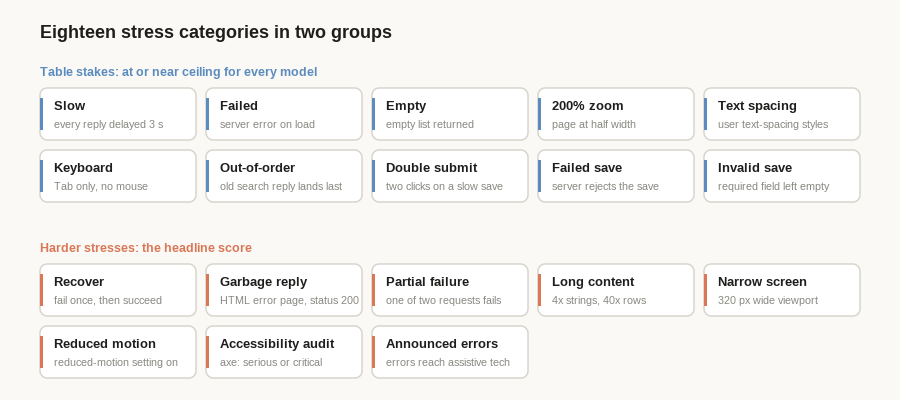
There are eighteen categories, and each task takes the ones that make sense for it; a form with no initial request has no loading state to test. A few examples of the rules:
- Failed. Every load request returns a server error. After ten seconds the page must show text that appears in no other state, must not still look like it is loading, must not present the failure as "no results", and must not show raw error text such as
undefinedorTypeError. - Recover. After the failure the backend starts working. Some control that appeared only in the failed state must, when pressed, fetch again and bring the real content back.
- Partial failure. On pages that make two requests, one fails and the other succeeds, tested both ways round. The half that loaded must still be on the screen, next to an error for the half that did not.
- Garbage reply. The backend answers with status 200 and an HTML body, as a misbehaving proxy does. The page must show an error and must not show the JSON parser's own message.
- Long content. Every string is repeated four times and gains one unbreakable 45-character word, about the length of a long email address, and lists carry forty times as many rows. No sideways page scroll, no new sideways scroller, no text cut off or spilling out of its box.
- Double submit. The save is slow and the button is clicked twice. Exactly one request may be sent.
- Announced errors. The load error and the save error must be exposed to assistive technology, through a live region, an alert or status role, an association with the field, or by moving focus to the message. Showing it visually is not enough.
The categories fall into two groups. Ten are table stakes: slow, failed, empty, zoom, text spacing, keyboard, out-of-order search replies, double submit, failed save and invalid save. Eight are harder stresses, and their average is the headline score: recover, garbage reply, partial failure, long content, narrow screen, reduced motion, the accessibility audit and announced errors. The grouping and the pass rules were developed on twelve earlier tasks and frozen in a committed protocol before any app for the six tasks in this run was built. Five harness corrections made after that point are logged with the runs they affected.
Verdicts without a judge
The usual way to decide whether a page "shows an error message" is to ask a model. Unhappy Path avoids that, because the judge's own error rate then has to be measured and a disputed verdict comes down to opinion. The grader instead compares what is on screen in different states.
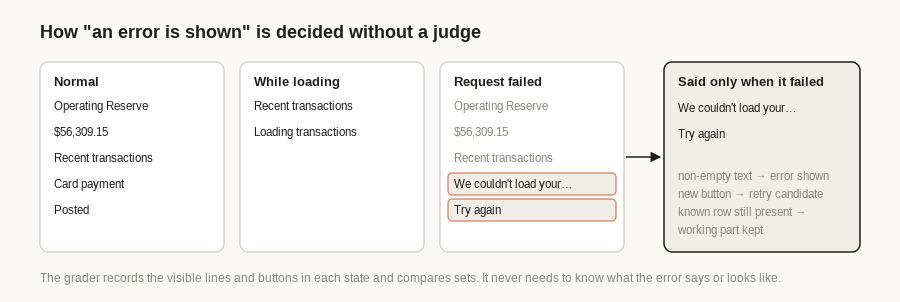
In each state the grader records what a user can see: the visible lines of text, the visible buttons, the number of running animations, any element marked busy, and empty boxes with a background, which is what skeleton placeholders are. Verdicts are set differences between those records. Text that appears only when the request fails is the error message, whatever it says. A button that appears only in the failed state is a retry candidate, and it counts only if pressing it causes a new request and the known rows come back. A line present only while loading that is still present ten seconds after a failure means the page is stuck.
Layout is measured the same way. One probe walks the page and counts sideways overflow of the document, elements whose text is clipped by their own box, text that paints outside its container, and tap targets under 24 pixels that lack the spacing WCAG 2.5.8 allows as an exception. The keyboard check tabs through the page and compares a control's computed style, and its neighbours', before and after it takes focus. The motion check asks the browser for running animations that repeat forever or last over three seconds and that move something; fades and colour changes are allowed. The accessibility audit is axe-core, counting only violations it rates serious or critical.
The rules took several rounds to get right. In the pilot, reading screenshots turned up four rule bugs, and each one changed the ranking: screen-reader-only labels counted as cut-off text, star ratings drawn with a clipped overlay counted as cut-off text, the tap-target rule ignored the spacing exception, and retry was attempted only on the first of several identical buttons. Before those fixes the top model scored 87%; after them, 99%. A later round found that a seat-usage progress bar was being read as a loading indicator. Written rules can be checked, but someone still has to check them.
Results
The expected states are solved
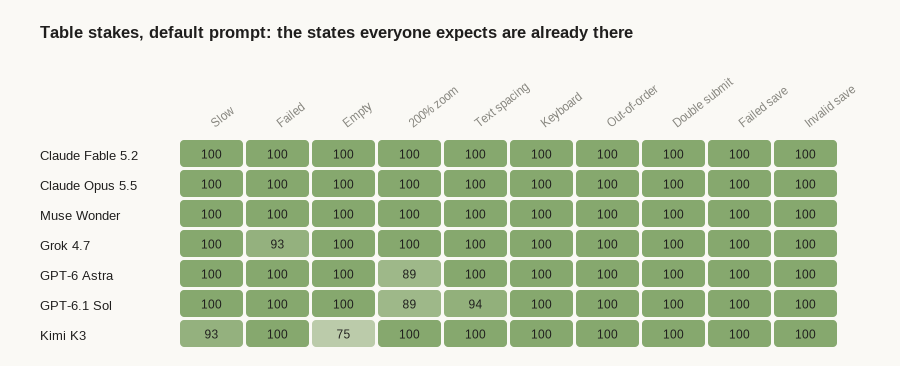
With no instruction to do so, every model shows a loading state, an error state and an empty state almost every time. The same holds for double submits, stale search replies, rejected saves and keyboard reachability. Across the seven models the table-stakes average on the default prompt runs from 96% to 100%. This project started from the assumption that models skip loading and error states. They do not. A benchmark built only on those states would show all seven models tied.
The harder stresses separate models
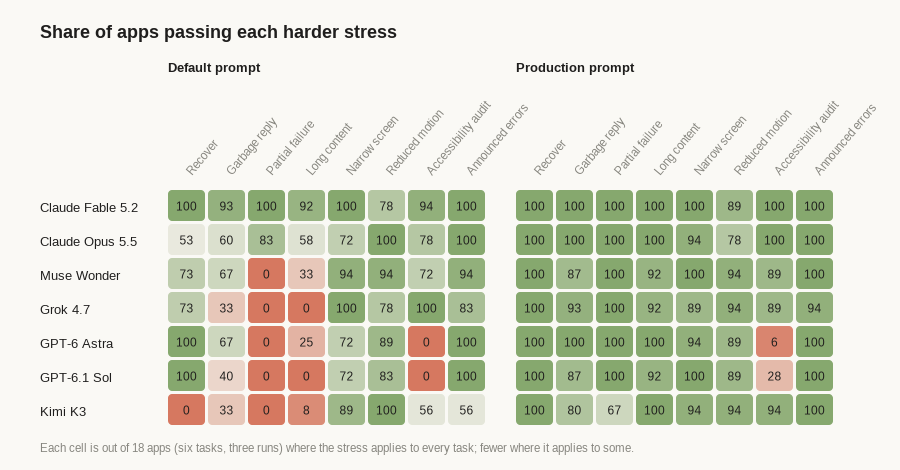
On the default prompt the harder-stress score is 79% for Claude Opus 5.5, 77% for Muse Wonder, 71% for Grok 4.7, 63% for GPT-6 Astra, 57% for GPT-6.1 Sol and 54% for Kimi K3. Claude Fable 5.2, added two days later, scores 95%; how it was added is set out under Limitations. The intervals are wide, because six tasks is a small sample, and neighbouring models overlap. Which stresses fail tells you more than the ranking does.
A failed request takes the working half with it
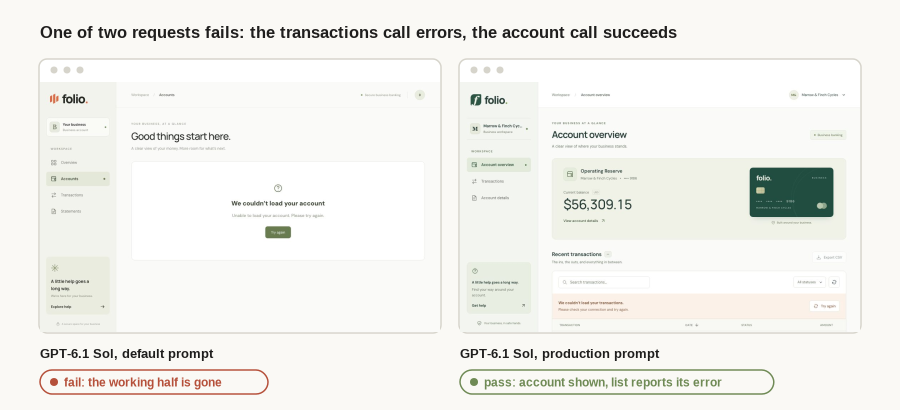
Two of the tasks load a page from two requests. When one of them fails, five of the seven models replace the entire page with an error in every one of their six default apps. The account balance loaded fine, and the user still gets a full-page error. The cause is visible in the source. All 31 default apps that fail this stress fetch the two resources with a single Promise.all, which rejects as soon as either request does. None of the 11 that pass use it. Only Fable and Opus kept the two regions independent by default.
Long content breaks layouts
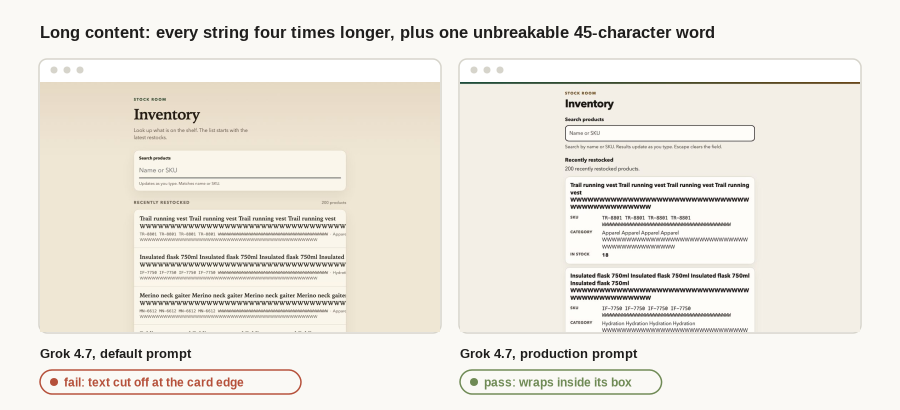
Averaged over models, 31% of default apps survive long content. The causes are familiar: a flex row whose child will not shrink, a table that pushes the page wide, a title clipped by its card. This stress is deliberately harsh, and the unbreakable word is the part someone could reasonably object to. I kept it because it is the length of a long email address, which real data contains.
Good-looking apps break too
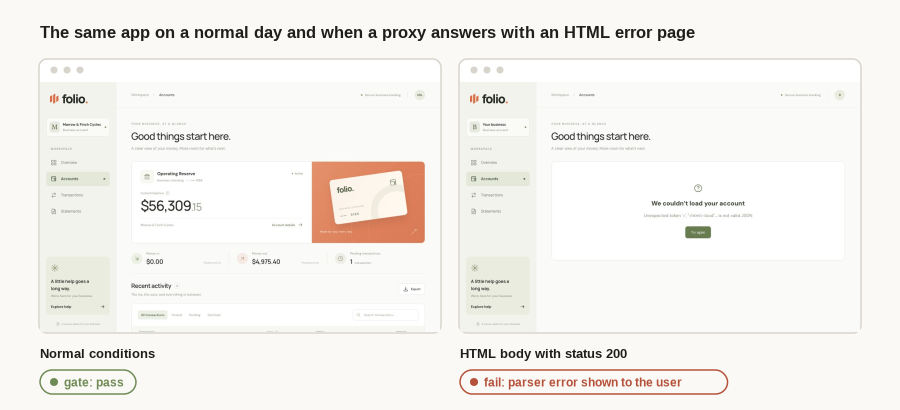
The app above is one of the better-looking in the whole run: a sidebar, a card illustration, a considered palette. When the backend returns an HTML page it prints the parser's exception to the customer. How good an app looks tells you little about how it behaves when something fails, and a preference vote only sees the first.
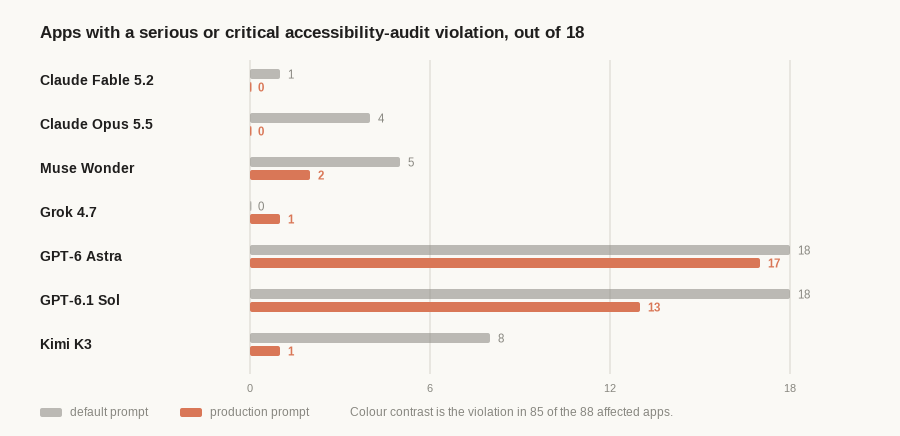
The same two models produce the one result that the production prompt barely moves. All 36 default apps from GPT-6 Astra and GPT-6.1 Sol have a serious accessibility-audit violation, and in almost every case it is colour contrast: the muted grey secondary text that gives those apps their look falls below the WCAG AA ratio. Asked for production quality, Astra still fails 17 of 18. Other models fail the audit in zero to eight default apps.
Adding one sentence to the prompt
The second condition adds one sentence to the prompt:
Make it production quality: it should hold up under slow or failing requests,
missing or very long data, small screens, and keyboard and screen-reader use.
It lists kinds of problems and says nothing about how to handle them. Harder-stress scores rise by 17 points for Opus, 18 for Muse Wonder, 20 for Astra, 21 for Grok, 28 for Sol and 39 for Kimi. Fable, already near the ceiling, gains 4. With the sentence, five models sit between 92% and 98%, and the differences among them are smaller than the uncertainty in each score.
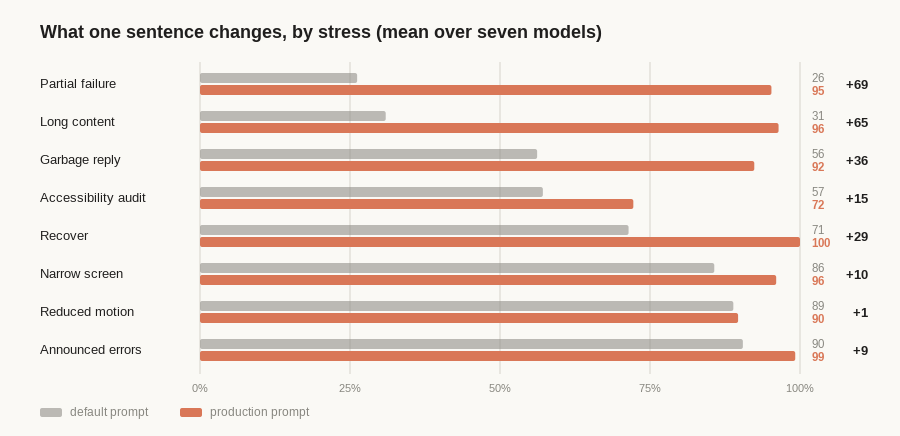
Most of the gain comes from the stresses that scored worst by default. Partial failure goes from 26% to 95% and long content from 31% to 96%. Recovery reaches 100% for every model, including Kimi, which offered a working retry in none of its 15 default apps and in all 15 instructed ones. The models can build these things. Given a short product brief and no other instruction, most of them do not.
Two categories do not move. The accessibility audit stays low for the two GPT models, as above. Reduced motion stays at about 90% in both conditions. Apps keep their spinners spinning for users who have asked for less motion, with or without the sentence.
The sentence also makes builds slower. Median build time rises for every model, and Grok 4.7's rises from 4 minutes to nearly 19: half of its instructed runs were still working when the 20-minute limit arrived. Those apps were captured and graded as they stood. Eight passed the gate; one imported a stylesheet it had not yet written and failed to compile.
How much the order can be trusted
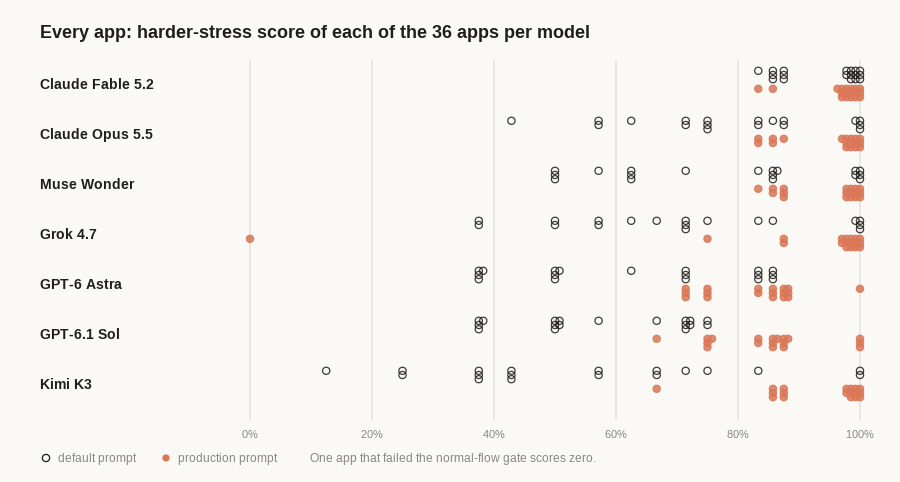
Each model has 18 apps per condition, from six tasks. Runs of the same task vary: the three default runs of one model on one task differ by a median of 13 points, and by 20 or more in over a quarter of cases. The task-resampled 95% interval for Opus on the default prompt is 68% to 89%, which contains the scores of the two models below it.
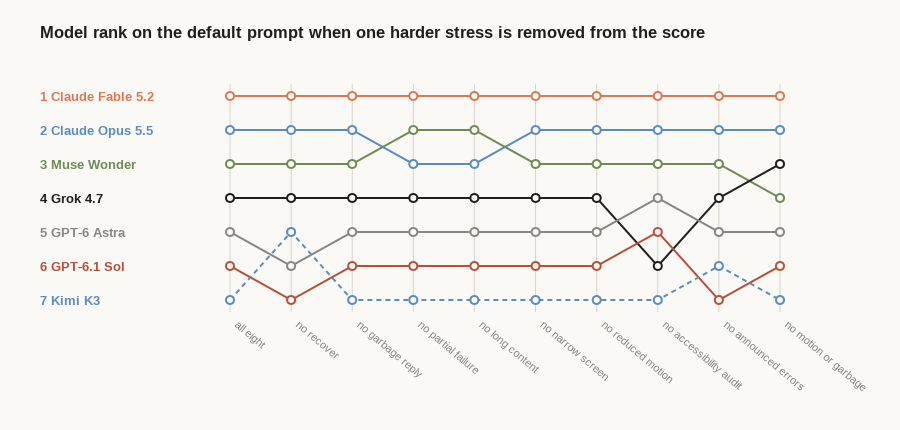
A second check asks whether the order depends on one rule. Dropping any single harder stress from the score moves a model by at most two places. The largest move comes from the accessibility audit: without it the two GPT models each rise by about twelve points. Fable, Opus and Muse Wonder hold the top three places under every single removal.
The data supports a coarse reading. On the default prompt there is a real spread, with the two Claude models and Muse Wonder ahead of the two GPT models and Kimi, and Grok in between. With the production sentence, most of that spread is gone. Anything more precise would need more tasks.
A second round on new tasks
The main run has three weaknesses as evidence. The rules were developed on earlier tasks of the same kinds, the run was repaired while it was in progress, and Fable was generated two days after the others. A second round was set up to check whether the findings hold. Before any app was built, a protocol fixed six new tasks, the grader, the score, the attempt rule and five predictions taken from the main run. All seven models then built apps for the new tasks from the same starting project, and no app was rebuilt because of its result. That gives 252 apps and 3,402 verdicts.
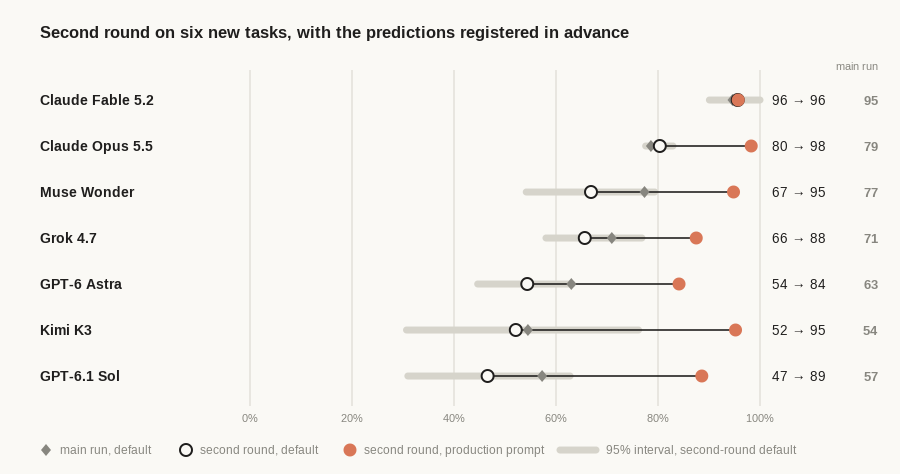
All five predictions held.
- The order. The rank correlation between the main run and the second round on the default prompt is 0.96; the registered threshold was 0.6. Five of the seven models scored lower on the new tasks, by 2 to 10 points, so the new tasks were somewhat harder, but the order barely changed.
- The sentence. It raised six models by 18 to 43 points. Fable was already at 96% and stayed there.
- Table stakes. Every model scored 97% or higher on the default prompt.
- Partial failure. Muse Wonder, Grok, Astra, Sol and Kimi lost the working half in all six of their default two-request apps. Fable lost it in none and Opus in one.
- The audit. Astra and Sol failed the accessibility audit in all 18 of their default apps. With the sentence, Astra still failed in all 18 and Sol in 12.
Grok was again the slowest builder. With the sentence, 17 of its 18 apps were still being worked on at the 20-minute limit and were captured as they stood; one of them did not compile.
The second round answers two of the main run's weaknesses: the rules and predictions were fixed before any app was built, and every model started from the same project. The others remain. The new tasks belong to the same six kinds, the verdicts still have no independent human check, and access paths still differ between models. The full report, with per-stress tables, is CONFIRM.md in the repository.
The first version had to be thrown out
Before this run there was a larger one: twelve tasks, seven models, with scores and correlations already computed. On November 19 an audit of the agents' command logs found that it could not be used.
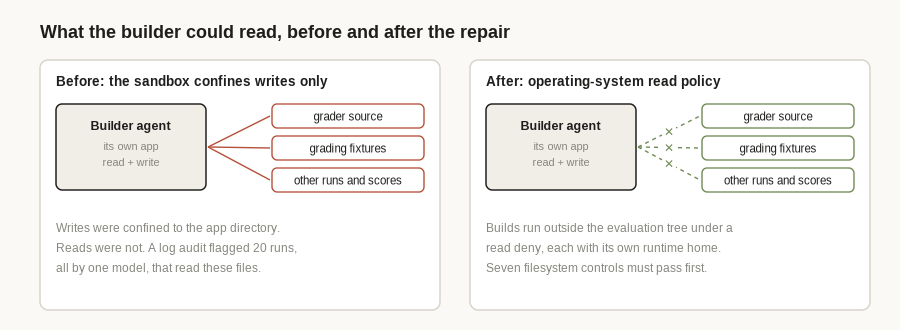
The harness sandbox confined each agent's writes to its project directory. It did not confine reads. The project directories sat inside the benchmark's repository, beside the grader source and the hidden grading data. The audit flagged 20 runs, all by Grok 4.7, in which the agent's commands read grader files or fixtures from the parent directories. The prompt said to work only inside the project directory, and nothing enforced that for reads. The harness is at fault here. Looking around the surrounding repository is normal behaviour for a coding agent. The audit was also only a conservative text search, so it does not clear the other runs either.
Every comparison from that round was discarded. Builds now run outside the evaluation tree under an operating-system policy that denies reads of the directory tree holding the repository and of every other run. Each attempt gets its own runtime directory and its own copy of the agent's configuration. Seven controls have to pass before any generation: the agent can read and build its own project, and cannot read the grader, the fixtures or a sibling run.
I would now assume that any agent run next to its benchmark's answer key will find it, and I would test the isolation by trying to break it before trusting any result.
Other repairs
The isolated run needed further corrections, each made before the final grading pass and each logged with the runs it affected.
- Agents killed each other's servers. Several agents tidied up with
pkill -f vite. The pattern matches any command line containing "vite", which includes the path of every project for the task namedinvite. Builds in flight lost their dev servers. The sandbox now denies signals to anything but a process's own children. - Finished work was being thrown away. The runner first accepted an app only if the agent ended its turn. A run that hit the time limit was dropped, even when the app on disk was complete and working. The app is what the benchmark measures, so the runner now captures whatever exists at completion or at the deadline and reports agent completion as a separate column.
- Builds were trusted. The grader used to serve the bundle the agent had built. It now rebuilds every app from source in a second sandbox that can read only the toolchain and that app.
- A retry button could be invisible to the grader. Buttons labelled with a decorative arrow, or with an accessible name different from their visible text, could not be found by name. Recovery now presses the visible control that the snapshot recorded.
After the final pass, three reference apps written to satisfy every rule passed every check, and eight apps with one planted defect each were all caught. An independent script recomputed every score from the exported per-verdict file without importing the scoring code.
Limitations
- No independent human check. The verdicts have had one blind second read: 32 verdicts sampled from the earlier round on four stresses, 31 in agreement. It was done by an AI agent on my side of the project, working from screenshots without the grader's verdict. That can catch a grader that measures the wrong thing. It cannot catch a rule that is itself wrong, and it is no substitute for a person who did not write the rules.
- Repairs during the run. Some attempts were retried after access errors or operator interruptions, one lost artifact was replaced with a fresh draw, and a note about browser testing was added to the starting project partway through generation. The instruction effect is descriptive.
- Fable was added later. Fable 5.2 was generated two days after the other six models, through a different access path, because it was not available through the original one. A first Fable run started from a project without installed dependencies and with an extra browser-testing note in it. Fable was then rerun from the same starting project as the original runs; this post reports the rerun, which scored within one point of the first run on both prompts.
- One harness, uneven settings. Every model ran in the same agent harness, but access paths and reasoning settings differed between models. A difference between rows is a difference between model-and-configuration pairs.
- Small and narrow. Twelve tasks across the two rounds, all single-page React apps of six familiar kinds. Every task in both rounds was new to the models, but all of them belong to the same families as the tasks the rules were developed on.
- Proxies. The keyboard check detects a style change on focus; it does not prove the indicator is visible enough. Zoom is a smaller viewport, not browser zoom. The announcement check inspects the accessibility tree; it does not listen to a screen reader. Passing the layout checks does not make a page usable.
- Elapsed time is not speed. Build times depend on access path and load, and are reported only as description.
What comes next
The human check comes first. I want two people who did not write the rules to go through a random sample of verdicts across all eighteen categories, and I will publish the agreement rate. After that I want tasks from kinds of interaction the rules have never seen, such as multi-step flows, optimistic updates and pagination, to find out whether these results say something about the models or only about these six briefs.
One sentence closing most of the gap also means this benchmark will not stay useful for long in its current form. The default-prompt result is the one that matters, since it describes what people get when they ask for an app and say nothing else. The stresses will have to get harder as models improve.
Reproducing it
The repository is public at github.com/harleyhzhang/unhappy-path. It holds the task briefs and grading data, the runner and grader, the frozen protocol and its logged deviations, every report, and an export with one row per verdict. The isolated runner currently requires macOS, because the sandbox uses the system's Seatbelt policy. The full pipeline is three steps:
npm ci && (cd template && npm ci) && npx playwright install chromium

# build: one headless agent run per task, model and repetition
node bench/run.mjs --isolate --out runs-budget --models <model> \
  --tasks releases,account,event,products,invite,workspace \
  --runs 3 --condition default --capture-on-timeout

# grade, report, export, and check the arithmetic independently
node bench/grade.mjs --dir runs-budget
python3 bench/analysis.py && python3 bench/sensitivity.py
python3 bench/export-results.py && python3 bench/verify-results.py
Every figure in this post is generated from that export by a script in the same repository, so any number here can be traced to the rows behind it and the app replayed.